For makers, professionals, and small businesses, choosing a laser device that handles metal and multi-material projects requires evaluating power, precision, and ease of use. This guide highlights five top options that balance performance and practicality, with clear considerations for home workshops and small studios.
| Product | Brand | Laser Power | Working Area |
|---|---|---|---|
| ACMER S1 3500mW | ACMER | 3.5W | 130×130 mm |
| Longer Ray5 20000mW | Longer | 20W | 400×400 mm |
| ACMER S1 6000mW | ACMER | 6W | 130×130 mm |
| Creality Falcon2 40W | Creality | 40W | Not specified |
| Carverall K15 Pro 5W | Carverall | 5W | Near A4 (200×300 mm) |
Note: All models listed here offer a blend of engraving and cutting capabilities across materials such as wood, acrylic, leather, and metals, with varying levels of precision, speed, and software compatibility. Safety and setup requirements vary by unit, so consult the manufacturer docs before use.
ACMER S1 3500mW: Precision For Small Projects

The ACMER S1 3500mW laser engraver is designed for high-precision work on a variety of substrates, including wood, acrylic, and metal alloys. With a diode laser power around 3.5 watts and a 2mm focal length, it delivers detailed engravings at speeds up to 10,000 mm/min and repeatable positioning accuracy near 0.01 mm. Its 130×130 mm working area suits small-format projects, from personalized gifts to signage. The unit is marketed as a 2-in-1 engraving and cutting solution, capable of handling thin plywood, MDF, and common plastics. It ships largely preassembled, minimizing setup time for beginners while offering enough capability for hobbyists and professionals who need reliable results with minimal downtime. Expect straightforward software support for hobbyist-friendly workflows, and verify material compatibility for dense or reflective metals before attempting cutting at maximum power.
Longer Ray5: High Power, Colorful Engraving

The Longer Ray5 stands out with a 20,000 mW laser module and a robust 400×400 mm work area, designed for thicker materials and deeper cuts. Its stated capabilities include cutting through pine up to roughly 15 mm in a single pass and etching stainless steel with multiple passes. The unit features a 256-color palette for in-house color engraving and ultra-fine laser points around 0.08×0.1 mm, enabling intricate multi-color designs on treated metals and dyed polymers. A 240 MHz ESP32 chipset powers multi-machine control and continuous operation, supporting 24/7 style workflows. While the software ecosystem supports LaserGRBL and LightBurn, users should verify compatibility with pilot projects and consider ventilation and safety requirements for metal cutting. This model is best suited for users needing serious throughput and multi-material versatility.
ACMER S1 2500mW: Compact Yet Capable
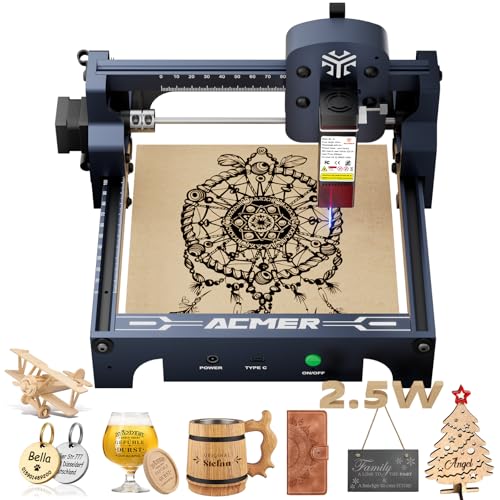
This ACMER S1 variant pares down power to 2.5 watts while preserving the core strengths of a compact 130×130 mm platform. It provides the same 0.01 mm repeatable positioning accuracy and up to 10,000 mm/min engraving speed, making it a practical choice for beginners and hobbyists focusing on detailed wood, acrylic, or leather work. The dual-function design remains a selling point, enabling both engraving and cutting on compatible substrates. As with other low-to-mid-power units, assess material reflectivity and thickness before attempting metal work, and prepare for careful test runs when approaching the upper end of thickness and density for any substrate.
Creality Falcon2: Big Power, Fast Throughput

The Falcon2 from Creality targets higher-throughput projects with a 40W laser output in a Class 4 system. It emphasizes rapid cutting and engraving, with claimed one-pass capabilities on thicker materials such as 20 mm cork and 30 mm black acrylic, plus colorful engraving on certain metal surfaces. An integrated air assist helps improve cut quality and reduce material scorching. The unit’s metal construction and advanced optics support higher precision and durability, making it suitable for studios that require frequent, larger-scale runs. Users should ensure proper ventilation, safety practices for Class 4 lasers, and compatibility with preferred design software to maximize productivity.
Longer Ray5 10000mW: Balanced Power And Control
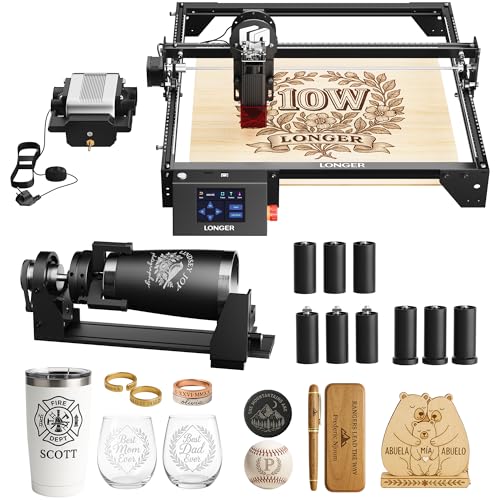
The Longer Ray5 10000mW model leverages a 10W laser for enhanced engraving and cutting capabilities, paired with an ESP32-based control system and a large 400×400 mm work area. It supports multiple connection modes (USB, Wi-Fi, TF card) and offline operation, with a built-in 3.5-inch touchscreen for on-device control. The kit includes additional accessories such as a rotary attachment for cylindrical objects and an air pump to improve cut quality on thick or dense materials. Overall, this option appeals to users seeking a versatile, expandable setup with strong software compatibility and offline workflow options. When planning metal work, confirm the machine’s ability to handle metal substrates and understand the multi-pass approach if needed.
Buying Guide: Key Purchase Considerations
- Laser Power and Material Capability
- Higher wattage enables thicker materials and deeper cuts, especially on metal and dense composites. Balance power with heat management and safety considerations.
- Assess whether you primarily engrave, cut, or both. For metals, expect specialized settings and potential post-processing steps.
- Working Area and Motion Precision
- Choose a size that fits your common project dimensions. Bigger work areas improve throughput for batches but come with higher costs and space needs.
- Look for repeatable positioning accuracy around 0.01 mm for detailed work and consistent results across sessions.
- System Architecture and Software
- ESP32-based controllers and multi-machine support can boost efficiency in shared studios. Ensure compatibility with popular software like LightBurn, LaserGRBL, or CutLabX.
- Evaluate whether the unit supports offline operation, USB/Wi-Fi connections, and whether the included app or software meets your design workflow.
- Ventilation, Safety, and Compliance
- Class 4 systems require robust ventilation and strict safety protocols. For hobbyist use, consider lower-power or enclosed units with proper safety features.
- Verify material safety data for suspected substrates and follow eye/skin protection guidelines and fire prevention measures.
- Setup, Maintenance, and Expandability
- Preassembled units save time, but confirm maintenance requirements and availability of spare parts. Look for modular features like air assist, rotary attachments, and upgrade paths.
- Consider service availability, warranty terms, and customer support responsiveness when purchasing from brands with global reach.
- Cost of Ownership and Workspace Fit
- Factor in electricity usage, cooling requirements, and the cost of consumables (e.g., safety gear, replacement lenses, and service kits).
- Ensure your workspace meets size, ventilation, and electrical requirements before committing to a large unit.