Industrial touch screen PCs blend rugged reliability with interactive usability, ideal for manufacturing floors, kiosks, POS systems, and automated environments. This guide highlights five top options, covering monitors and all-in-one PCs designed for heavy use, 24/7 operation, and flexible mounting. Explore features, durability, and compatibility to help you choose a solution that matches your workflow.
| Product | Brand | Type | Key Feature |
|---|---|---|---|
| MAGEX | Monitor | 10-point touch with multiple inputs | |
| TouchWo | All-in-One PC | Android 11, multiple apps via Play Store | |
| 15.6″ All-in-One Desktop (Win 11 Pro) | OuuOee | All-in-One PC | 180° adjustable touch display |
| TouchWo 21.5″ Android 11 (Second Model) | TouchWo | All-in-One PC | Android 11, built-in speakers, multiple interfaces |
| NORQIN 21.5″ Embedded Industrial PC | NORQIN | Industrial Panel PC | IP65 touch protection, Windows OS |
MAGEX 15.6″ Touchscreen Monitor

MAGEX delivers a 15.6-inch true IPS HDR display with 178-degree viewing angles, 1080p resolution, and 450 cd/m² brightness. The monitor supports 10-point capacitive touch, enabling precise multi-touch gestures across a wide field of view. Compatible inputs include HDMI, VGA, DVI, and USB B for touch functionality, allowing easy integration with PCs, Raspberry Pi projects, POS systems, and industrial setups. A remote and built-in speakers expand its utility for kiosks and control rooms. Note that touch may depend on device system protections; ensure proper connections with a Type-A to Type-B USB cable to enable touch.
Key considerations: verify device compatibility with touch via the USB B interface, confirm mounting options (VESA compatibility), and assess brightness and color accuracy for the installation environment. The 16:9 aspect ratio suits landscape layouts for dashboards and control interfaces, while the wide viewing angle helps teams collaborate around a single screen.
TouchWo 21.5 Inch Android 11 Industrial PC

This all-in-one Android tablet-style PC combines a 21.5-inch FHD panel with Android 11, making it suitable for classrooms, meeting rooms, or industrial control panels. It features RK3568, expandable storage via TF/SD, and Play Store access for apps such as WhatsApp, Gmail, Netflix, and YouTube. Connectivity includes USB ports, HDMI output, LAN, WiFi, and built-in speakers, enabling quick deployment for POS, CCTV displays, or factory floor dashboards. The device supports multi-finger touch without drivers, and its large screen is ideal for collaborative tasks and interactive training sessions.
Key considerations: examine durability for industrial environments, check mounting compatibility and heat management, and confirm availability of spare parts or service if used in critical operations. Evaluate whether Android app support aligns with workflow requirements or if a Windows-based solution is preferable for legacy software.
15.6″ All-in-One Desktop (Win 11 Pro)
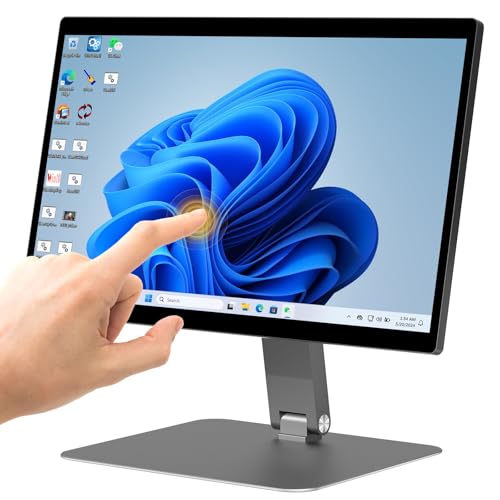
This all-in-one desktop integrates a 15.6-inch FHD IPS touchscreen with Windows 11 Pro, powered by an Intel N5095 processor and 8GB RAM with 128GB storage. The 180-degree adjustable screen enables flexible viewing orientations for demonstrations, training, or collaborative work on the shop floor. The compact, cable-minimized design reduces clutter while delivering precise touch input for dragging, zooming, and switching apps. It is well-suited for automation terminals, kiosk interfaces, or office integration in industrial settings.
Key considerations: assess CPU performance for your software stack, ensure reliable 24/7 operation if required, and evaluate upgrade paths for RAM/storage. Also consider mounting options and thermal design to maintain stable performance in humid or dusty environments.
TouchWo 21.5 Inch Android 11 (Second Model)
This Android-based 21.5-inch touch PC emphasizes a multi-purpose all-in-one form factor with Android 11, RK3568, and 4GB RAM/32GB ROM. It features 10-point touch, two USB ports, HDMI, SD card, LAN, and WiFi, plus built-in speakers. The device supports Play Store apps for classroom, meeting, or retail deployments and suits POS systems, CCTV displays, and industrial monitoring where quick app access and touch interaction are required.
Key considerations: compare RAM and storage capacity to your app needs, verify Bluetooth and peripheral compatibility, and ensure robust mounting for industrial use. Verify firmware updates and long-term OS support for the Android platform in enterprise contexts.
NORQIN 21.5 Inch Embedded Industrial PC

NORQIN presents a robust 21.5-inch embedded industrial touch panel PC with IP65-rated front protection and a 10-point capacitive G+G touchscreen. It runs Windows OS and is designed for 24/7 operation in harsh environments, making it ideal for kiosks, factory automation, digital signage, and enterprise deployments. The system supports 6×COM, 2×LAN, HDMI, USB, and wireless options, enabling integration across automation networks and control systems. The panel is built for reliability in industrial settings and supports custom configurations for Linux or Android as needed.
Key considerations: evaluate IP rating and ingress protection for your environment, confirm available I/O (COM, LAN, USB) for your devices, and plan for maintenance access and field upgrades. Consider thermal management and dust resistance when installing in manufacturing floors or kiosks.
XBONFIRE 15.6″ Touchscreen Monitor

XBONFIRE offers a 15.6-inch HDR 1080p IPS touchscreen with 10-point capacitive touch and a broad 178-degree viewing angle. The monitor supports HDMI, VGA, DVI, and USB B for touch, plus built-in speakers and VESA mounting compatibility. It delivers sharp color accuracy with 100% sRGB coverage and stable touch performance without driver installation, ideal for PC, Raspberry Pi, POS, kiosk, or industrial equipment interfaces. The wide-compatible ports enable quick integration into varied control setups.
Key considerations: verify USB touch initialization via the USB-B connection, confirm brightness and viewing conditions on the shop floor, and assess mounting and vibration tolerance for industrial installations. Consider whether a powered USB hub is needed for multiple USB peripherals on the same unit.
OuuOee 15.6″ All-in-One Desktop (Android 12)

OuuOee’s Android-based all-in-one combines a 15.6-inch FHD touchscreen with Android 12, offering 4GB RAM and 64GB ROM, plus HDMI, USB, WiFi, Bluetooth, and a microSD expansion. Its 360-degree rotating screen and 180-degree folding bracket provide flexible display angles for kiosks, classrooms, or control rooms. The integrated camera and speakers support collaborative tasks, while the Android OS supports a wide range of apps via the Play Store for productivity and training on the factory floor.
Key considerations: check for long-term Android OS support and security updates, evaluate enclosure ruggedness for industrial environments, and determine whether external peripherals are needed for your workflow. Consider power supply stability and mounting options for high-traffic areas.
Buying Guide: Key Purchase Considerations
- Touch technology and input requirements: Decide between capacitive 10-point touch for multi-touch gestures and glove-friendly operation, versus resistive alternatives. Confirm USB touch support if needed for Windows or Linux devices.
- Display quality and viewing conditions: Prioritize IPS panels with high brightness, contrast, and wide viewing angles for dim or bright industrial spaces. Consider HDR and color accuracy if the display serves as a control dashboard or digital signage.
- Durability and protection: For harsh environments, look for IP ratings (IP65 or higher), sturdy chassis, heat management, and vibration resistance. Check for options like fanless designs and sealed ports.
- Connectivity and expansion: Ensure the device offers the required inputs (HDMI, VGA, DVI, USB, Ethernet, COM ports). Confirm USB touch compatibility and the availability of expansion slots or network options for future upgrades.
- Operating system and software ecosystem: Windows-based systems suit legacy software; Android-based units excel with mobile apps and quick deployment. Confirm OS support timelines and update policies for security and compatibility.
- Mounting and space considerations: Verify VESA compatibility, stand options, and the ability to rotate or tilt displays for multi-person collaboration. Consider cable management and ease of maintenance on the shop floor.
- Performance and storage: Review CPU/RAM specs for all-in-one PCs to ensure smooth multitasking. Assess storage capacity and expansion options, especially for data-intensive applications or offline operation.
- Power and reliability: Check for SAG (standby/auto power) features, reliable power adapters, and heat dissipation. For 24/7 operation, consider redundancy and service support in your region.
Industrial touch screen PCs offer a range of form factors—from standalone monitors to integrated all-in-one units. When selecting, balance touch responsiveness, display quality, durability, and ecosystem compatibility with your operational needs. Matching the right device to your workflow will improve interaction efficiency, reduce training time, and support consistent, repeatable performance in demanding environments.