Fanless industrial mini PCs offer compact, rugged performance for factories, kiosks, POS, and remote sites. This guide highlights five top options, each designed for continuous operation with silent cooling and solid expandability. Compare processors, memory, storage, and I/O to choose the right fit for your industrial needs. All models below are fanless, rugged, and suitable for 24/7 deployment in demanding environments.
| Product | Brand | Key Strength | Top I/O Highlights |
|---|---|---|---|
| KINGDEL Fanless Industrial PC (B081L4M3HJ) | KINGDEL | Core i7, 16GB RAM, 512GB NVMe | 4x USB 3.0, 2x COM RS232, 4K@60, HDMI/VGA |
| FANPEEC Industrial Mini PC (B0DPMFLL34) | FANPEEC | Core i7-10610U, 32GB RAM, 1TB SSD | 6x COM, 8x USB, dual NIC, TPM 2.0 |
| HISTTON Fanless Mini PC (B0BZ4BKBND) | HISTTON | Core i5-8265U, 16GB RAM, 512GB SSD | 2x RS232, 2 LAN, 4K dual display |
| msecore Fanless Industrial PC (B0CMGN531K) | msecore | Core i7-5500U, 16GB RAM, 512GB SSD | 4x USB3.0, 2x RS232, VGA/HDMI |
| WEIDIAN Fanless Mini PC (B0F43QF445) | WEIDIAN | N100, 8GB RAM, 256GB SSD | 2x RS232, 2x LAN, 4K dual display |
KINGDEL Fanless Industrial PC, Core i7 (B081L4M3HJ)

The KINGDEL mini PC integrates a 4-core i7 processor, 16GB DDR4 RAM, and a 512GB NVMe SSD. It supports 4K resolution (4096×2304) and dual monitor output via HD and VGA ports. The metal case aids cooling, while multiple USB 3.0 ports and COM RS232 interfaces enable industrial connectivity. This configuration targets tasks requiring robust processing without active cooling, such as data logging, edge analytics, and digital signage in harsh environments.
FANPEEC Industrial Mini PC with 32GB RAM

Powered by an advanced Core i7-10610U, this FANPEEC unit emphasizes multitasking for industrial software, data analysis, and IoT workloads. It offers dual NVMe/SATA storage, expansion up to 2TB, and up to 64GB DDR4 across two SO-DIMM slots. I/O includes six COM ports (configurable RS232/485/422), eight USB ports, dual Gigabit Ethernet, and GPIO. Optional features like a 4G/5G module via CAN ports profile support for IoT deployments in factory floors or remote sites.
HISTTON Fanless Mini PC, Dual Display

HISTTON pairs a Core i5-8265U with 16GB RAM and 512GB SSD in a compact, fanless chassis. It supports 4K UHD output on two displays with Intel graphics and includes dual LAN and two RS232 ports. The device is designed for office, training, and light industrial uses, delivering reliable performance while minimizing noise and dust intake in 24/7 environments.
msecore Fanless Industrial PC, 16GB/512GB

msecore’s mini PC uses a Core i7-5500U, 16GB RAM, and 512GB SSD to deliver steady performance for office, PLC, and signage tasks. It provides dual LAN, 4x USB 3.0/2.0, VGA, HDMI, and two RS232 COM ports. The fanless metal case reduces dust intrusion and ensures quiet operation, making it suitable for classrooms, retail kiosks, and small control rooms. Windows 10 Pro is included, with Linux compatibility noted for broader software support.
WEIDIAN WEIDIAN Fanless Mini PC, N100

WEIDIAN’s fanless N100 platform delivers a balance of power and efficiency with dual 4K-capable outputs via HD and VGA, plus dual Gigabit Ethernet and RS232 interfaces. Operating under Windows 11 Pro or Linux options, it suits digital signage, light automation, and multi-display setups. The silent design makes it appropriate for offices and classrooms embedded in industrial environments.
WEIDIAN Fanless PC, Triple Display

WEIDIAN’s 10th Gen i7-10810U-based model focuses on high-end performance with 3-display support via HDMI/DP and RS232/RS422/RS485 options. It ships with Windows 11 Pro and offers dual NICs plus 6 USB ports and GPIO. This configuration targets industrial control rooms, surveillance hubs, and advanced digital signage deployments requiring robust multitasking and expanded connectivity.
KINGDEL Fanless Industrial PC, i7 Dual Core
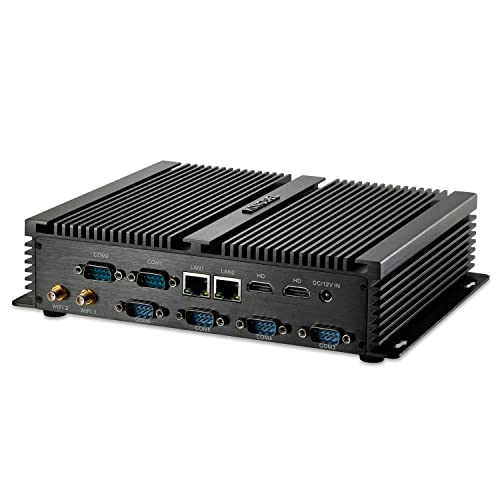
This KINGDEL model pairs an Intel i7-based CPU with 8GB RAM and 512GB mSATA SSD, offering a reliable plug-and-play option for light industrial tasks. It includes 2x HD ports and 6x USB 3.0, with 6x COM RS232 interfaces suitable for PLC communication and data acquisition. The compact, fanless design supports quiet operation in office-adjacent environments and on the factory floor.
KINGDEL Industrial Mini PC, 12th Gen i7

KINGDEL’s latest fanless mini PC uses 12th Gen i7 CPUs (various SKUs), with 16GB RAM and 512GB NVMe SSD. It supports 4K output at 60Hz, two HDMI/DP-like ports, and dual-band wireless connectivity for on-site management and edge processing. The device targets more demanding automation tasks where high-core performance and reliable storage are essential.
Buying Guide: Key Purchase Considerations
When selecting a fanless industrial mini PC, consider processing power, memory, storage, and I/O alignment with your use case. Evaluate thermal design for continuous operation in dusty or hot environments, and confirm enclosure ratings (e.g., IP, aluminum chassis) for industrial settings. Consider expansion potential: NVMe/SATA storage, RAM capacity, extra PCIe or CAN ports, and whether 4G/5G modules are required for remote monitoring. Connectivity options such as RS232/RS485, Ethernet ports, and USB configurations should match your PLCs, sensors, and peripherals. Finally, verify OS support (Windows 10/11 Pro, Linux) and driver availability for long-term maintenance.
Practical deployment tips: map your I/O needs to avoid overpaying for unused ports; plan for space constraints with compact footprints; and implement anti-dust and anti-static handling in installation areas. For 24/7 operations, prioritize fanless designs with robust enclosures and proven reliability in similar environments. Cross-check warranty terms and supplier support in case of field repairs or firmware updates. Consider whether dual displays are necessary for your workflow and if auto power-on aligns with unsupervised operation requirements.