Choosing the right desktop fiber laser cutter can boost small business productivity, enable precise marking on metals, plastics, and jewelry, and support rapid prototyping. This guide profiles five capable options, highlighting what each model does best, compatibility with software, engraving speeds, and practical working areas. All selections are designed for desktop setups, with varying levels of power, accuracy, and ease of use to suit hobbyists and professionals alike.
| Product | Brand | Laser Power | Working Area | |
|---|---|---|---|---|
| MR. CARVE S4-20W Fiber Laser Marking Machine | MR. CARVE | 20W | Compact table area; adjustable lenses | LightBurn compatibility and dual red laser alignment |
| Monport 30W Fiber Laser Engraver | Monport | 30W | Approximately 150×150 mm working area | High speed, 0.01 mm engraving accuracy, long 100,000 hour lifespan |
| xTool F2 5W IR & 15W Diode Dual Laser Engraver | xTool | 5W IR / 15W Diode | Compact desktop footprint | Built-in 50MP camera, 6000 mm/s, 0.00199″ motion accuracy |
| Cloudray Laser Engraving Machine 50W | Cloudray | 50W | 4.3″x4.3″ and 6.9″x6.9″ typical areas | EzCad2 & LightBurn compatibility, fast engraving |
| GWEIKE G2 20W Fiber Laser Engraver | G·WEIKE | 20W | 110×110 mm | High speed up to 15000 mm/s with deep engraving capabilities |
MR. CARVE S4-20W Fiber Laser Marking Machine
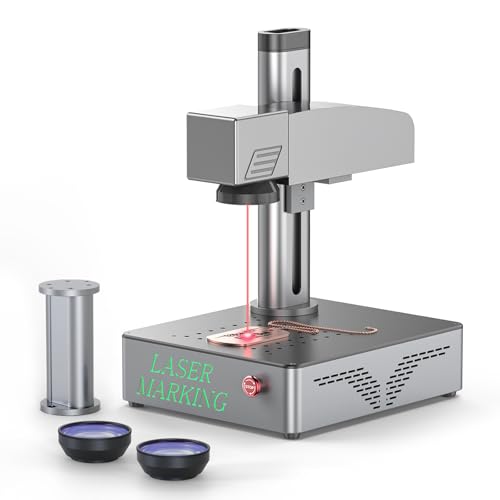
The S4-20W model from MR. CARVE focuses on precision and versatility for metal, jewelry, and plastics. It provides two replaceable lenses—110mm and 200mm—to adapt to different engraving tasks, with the 110mm lens optimized for relief and deep engraving on metals, and the 200mm lens used for larger-area projects when paired with an extension column. The machine claims engraving precision at 0.01 mm and features ultra-fine spot technology for intricate finishes. A new chip design reportedly increases engraving speed by 50% and extends laser lifespan to about 10,000 hours. Dual red laser alignment ensures focus alignment when the two red dots converge. It supports LightBurn software for image processing, vector editing, QR code generation, and serial numbering, enhancing workflow for design-to-product cycles.
Monport 30W Fiber Laser Engraver

The Monport 30W fiber laser engraver emphasizes compact design without sacrificing performance. It offers a compact working area around 150×150 mm, making it suitable for desk setups. The system uses a refined galvanometer and higher-grade silicon reflectors to achieve speeds up to 10,000 mm/s and a noted engraving accuracy of 0.01 mm. A customized F-theta field mirror complements the marking system, contributing to precision across the entire working area. The device also stresses longevity, claiming up to 100,000 hours of operation, and appears optimized for metals such as gold, silver, copper, stainless steel, brass, and titanium. The model emphasizes reliable performance for small business tasks and rapid prototyping on metal surfaces.
xTool F2 5W IR & 15W Diode Dual Laser Engraver

The xTool F2 combines a dual-laser setup—5W infrared and 15W diode—for expanded material versatility, including metals and thicker substrates. It includes a built-in 50MP camera to visualize the workspace with high alignment precision, reportedly down to 0.1 mm on small pieces. With speeds up to 6000 mm/s, the system promises rapid card engraving and reliable batch processing, especially when used with accessories like a slide extension for coasters or phone cases. The F2 supports 3D embossing and color marking on metal, offering strong performance for both hobbyist and small-scale production environments. It integrates with popular software to accommodate both novice and advanced workflows.
Cloudray Laser Engraving Machine 50W

The Cloudray 50W fiber laser offers solid performance in a desktop-friendly footprint. It features dual-laser support with a robust galvo scanner head and EzCad2 or LightBurn compatibility, expanding software options for users. The device provides two working-area options: 4.3″x4.3″ and 6.9″x6.9″, with a manual lift column that supports up to a 7.9″x7.9″ larger area via height adjustment. The laser is marketed with a long lifespan—over 100,000 hours—and high marking speeds up to 10,000 mm/s, enabling rapid marking and engraving on wood, leather, and metal. Its versatility makes it suitable for beginners and educational settings as well as more advanced projects.
GWEIKE G2 20W Fiber Laser Engraver

The GWEIKE G2 is a 20W fiber laser engraver designed for fast, accurate metal marking. It delivers speeds up to 15,000 mm/s and supports deep engraving on metals, with 0.001 mm engraving accuracy across selectable resolutions (2K, 4K, 8K). A dual red-light positioning system helps with precise focusing, while the fully digital Galvano scanning system supports both square and graphic previews. The G2 is positioned as a capable desktop option for jewelry, leather, dog tags, and other metal applications, combining quick setup with reliable, repeatable results.
Buying Guide: Key Purchase Considerations
- Material compatibility: Verify which materials you plan to engrave or cut (metals, plastics, wood, leather) and ensure the laser power and wavelength suit those substrates.
- Working area vs. footprint: Desktop units vary from compact 110×110 mm to larger 150×150 mm or adaptable zones. Match the bed size to your typical project dimensions.
- Speed and precision: Look for specified engraving speed (mm/s) and position accuracy (mm or sub-mm) to estimate production timelines and detail realism.
- Software compatibility: Check integration with LightBurn, EzCad2, LaserGRBL, or proprietary ecosystems. Compatibility with popular design workflows reduces ramp-up time.
- Lifespan and maintenance: Consider laser diode or fiber lifetime estimates and how often you might need component updates or alignment checks.
- Safety and compliance: Ensure the device has appropriate safety features for desktop use, including enclosure options and Class 1 or II classifications when applicable.
- Upgrade and ecosystem: Evaluate availability of replacement lenses, ambidextrous focusing aids, and expansion accessories (extension columns, larger work areas) that future-proof your setup.
- Price-to-performance balance: Weigh advertised wattage against actual engraving performance, software support, and upgrade paths to determine long-term value.
- Customer support and documentation: Access to clear manuals, firmware updates, and responsive support can reduce downtime and learning curves.